Trader Onboarding
Sign up → get credentials → connect Rithmic → trade within the rules → pass → activate PRO → request payouts.
0 — Before you start
Know the journey and pick the right evaluation path.
-
1
The path
Evaluation (simulated) → hit profit target without breaking drawdown → activate PRO (separate fee, 7 days) → trade under PRO rules → request payouts when eligible. Evaluations do not pay out.
-
2
Choose size and drawdown model
Sizes: $25K, $50K, $100K, $150K. Models:
- Intraday trailing: live equity threshold rises with peak balance (incl. unrealized); no daily loss limit on eval.
- EOD drawdown: threshold set from daily close, enforced live next session; session daily loss limit applies.
Use the chips at the top of this page so the rest of the guide matches your purchase. Full tables: Plan Rules.
-
3
Eligibility checklist
- Legal name on signup must match your government ID.
- Confirm your country is allowed — see Restricted Countries.
- Credentials and accounts are for your exclusive use only.
1 — Sign up & pay
Create your Edmond account, choose an eval plan, and complete checkout.
-
1
Choose a plan
Pick a size below (matches the homepage Evaluation Plans section). Use the Intraday / EOD chips at the top of this guide so the list matches your model.
-
2
Complete the signup form
On /signup: use your legal name as on ID. Snippets below match the live form (not a live embed — no extra requests).
Account Information
Email Address * Password *••••••••••Confirm Password *Personal Information
Country *First Name *Last Name *Select CountryPhone Number(Optional)Street Address *Zip/Postal Code *City *State/ProvinceState/ProvinceEnter State/Province if applicable.
00000 if noneUS residents: enter exactly 5 digits. Non-US: enter 00000 if none.
Important Information & Policies
Refund Policy:Due to the nature of our service and the immediate provision of evaluation accounts and platform access upon purchase, all fees are final. Edmond Trader Funding does not offer refunds. Please ensure you have read and understood all rules and risks before completing your purchase.
Billing & Cancellation:This evaluation is a one-time fee with no automatic renewal on this eval purchase. You have 30 calendar days from your start date (Day 0 through the end of Day 30) to pass. If you have not passed by then, the evaluation expires. Paid resets are available only during your remaining time in that same 30-day window and do not extend the period. If you pass, activating your PRO Account is a separate fee — see PRO pricing when you upgrade.
Prohibited Trading Conduct:Engaging in prohibited trading practices will result in immediate account termination without refund. Prohibited practices include, but are not limited to: exploiting platform or data feed errors, using prohibited arbitrage strategies, coordinating trades between multiple accounts, and account sharing. Please refer to our full Terms of Service for a complete list.
Risk & Simulation Disclosure:All trading within the Edmond Trader Funding evaluation and PRO accounts is conducted in a simulated environment with virtual funds. Trading futures involves substantial risk and is not suitable for all investors. Past performance is not indicative of future results. This is an evaluation of trading skill, not an investment opportunity.
Sign Up & Proceed to PaymentI have read, understood, and agree to all terms and conditions presented on this page, including the Terms of Service, Privacy Policy, and all specific acknowledgements regarding Billing, Data, Refunds, Prohibited Conduct, and Risks. *
-
3
Pay with Stripe
Evaluations are a one-time charge — no automatic monthly renewal on the eval. After “Sign Up & Proceed to Payment”, complete card details on the same page.
Do not use commas or dashes on the form. US residents: 5-digit zip only. Non-US with no zip: enter 00000. Apply coupon codes before checkout — discounts cannot be adjusted after payment.
Complete Your Payment
Plan: $25,000 Evaluation Account
Amount: $69.95
Card Details *Card number · MM/YY · CVCConfirm Payment -
4
Open your dashboard
Account should show Active. Charts may show pending EOD until Rithmic’s overnight sync — that is normal.
After payment, open Dashboard (login required).
2 — Find your credentials
You need these to log in to Rithmic or TradeSea. Same User ID and password for both.
-
1
Open Setup and Key
Dashboard → Setup and Key. Copy User ID and password. Also note the System / Gateway from your welcome email (often Rithmic Paper Trading).
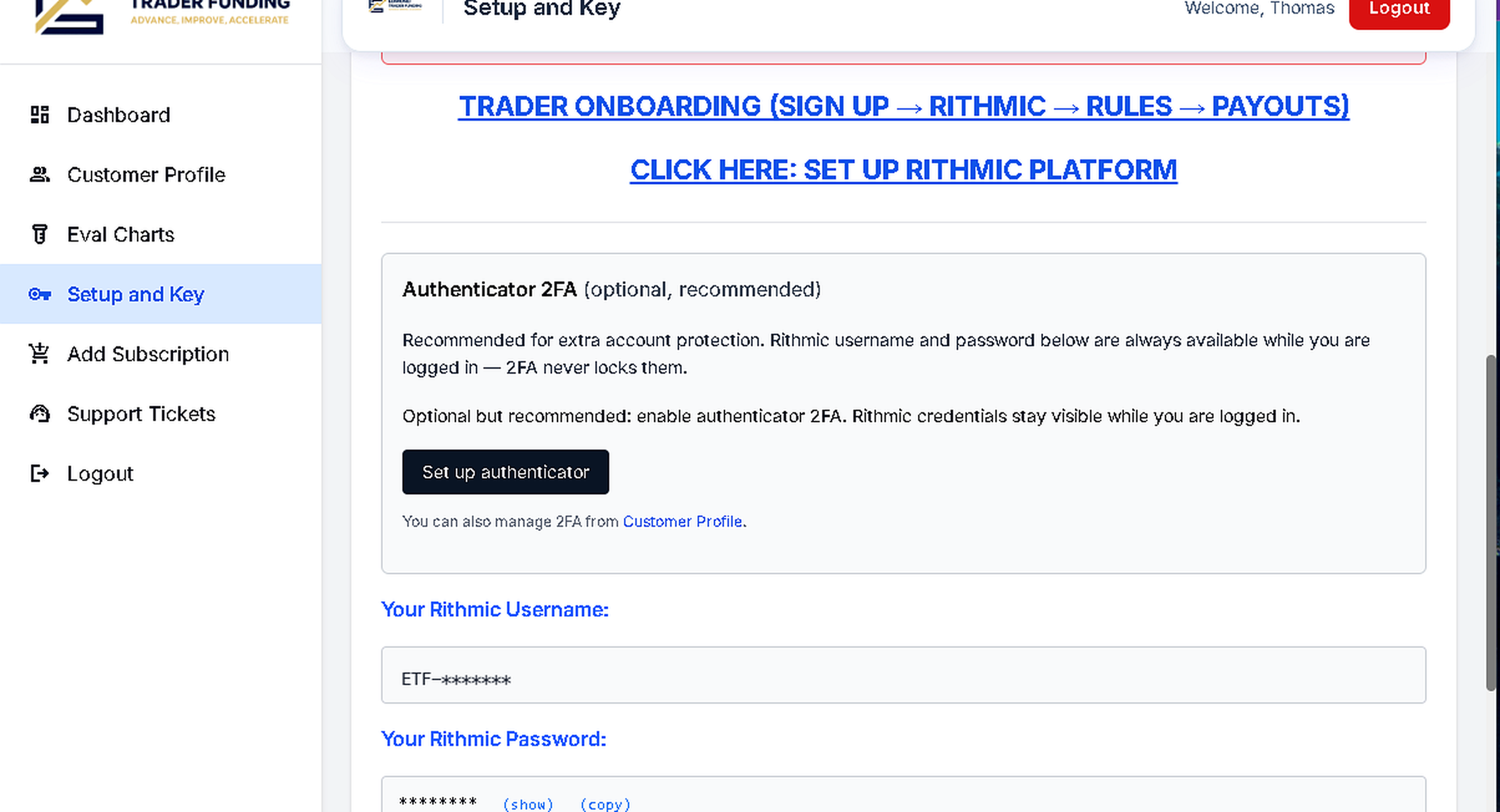
Setup and Key — copy your User ID and password (example shown with ID masked). -
2
Keep credentials private
Do not share logins, devices, or copy-trade with others. Sharing is a prohibited activity and can close the account. See Prohibited Activities.
3 — Connect Rithmic (or TradeSea)
Primary path is R|Trader Pro. TradeSea uses the same credentials. Full guides: Rithmic Setup · TradeSea Setup.
-
1
Install or open R|Trader Pro
Windows desktop from your welcome email, or download using this URL:
https://downloads.rithmic.com/rtraderpro.msi
Mac users can use the web version: rithmic.com/rtraderpro-web.
After install, log in with the User ID and password from Setup and Key. Select the paper System/Gateway from your welcome email.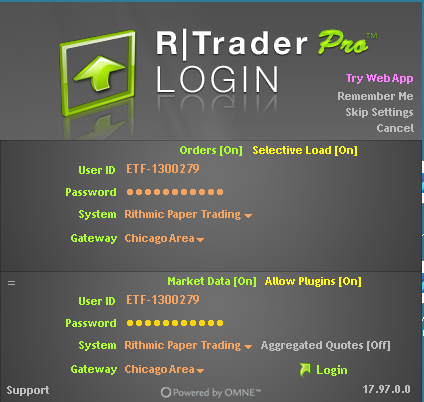
R|Trader Pro login — paste User ID and password from Setup and Key. -
2
Complete mandatory market-data agreements
Click the Mandatory market data agreements, scroll to the bottom, and click Agree. You cannot trade until these are accepted.
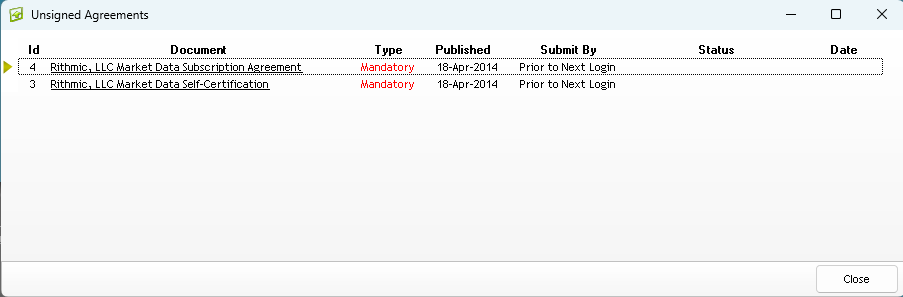
Open the Mandatory agreements. 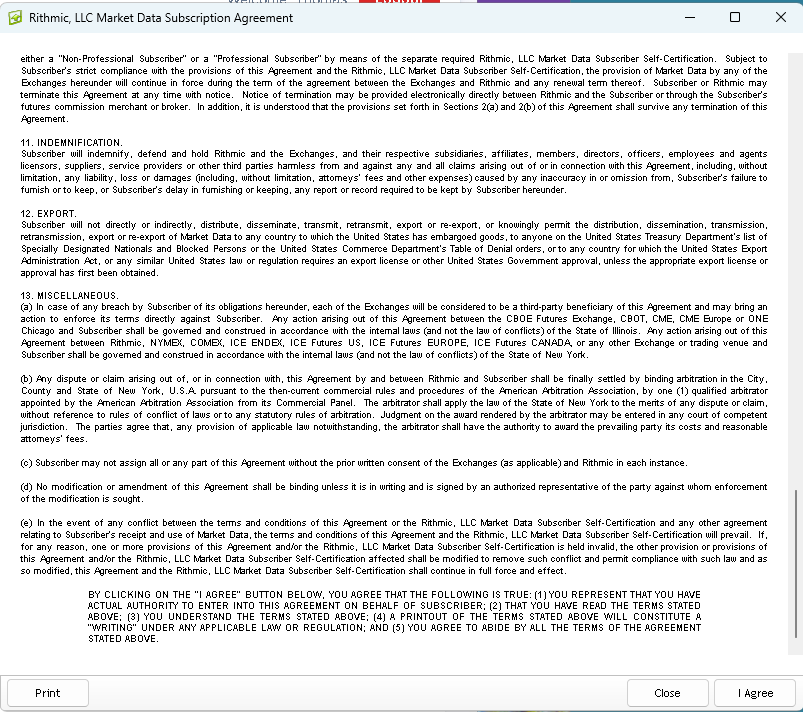
Scroll to the end and click Agree. -
3
Select Non-Professional (required)
You must choose Non-Professional for market data. Selecting Professional can trigger large extra exchange fees that Edmond does not cover.
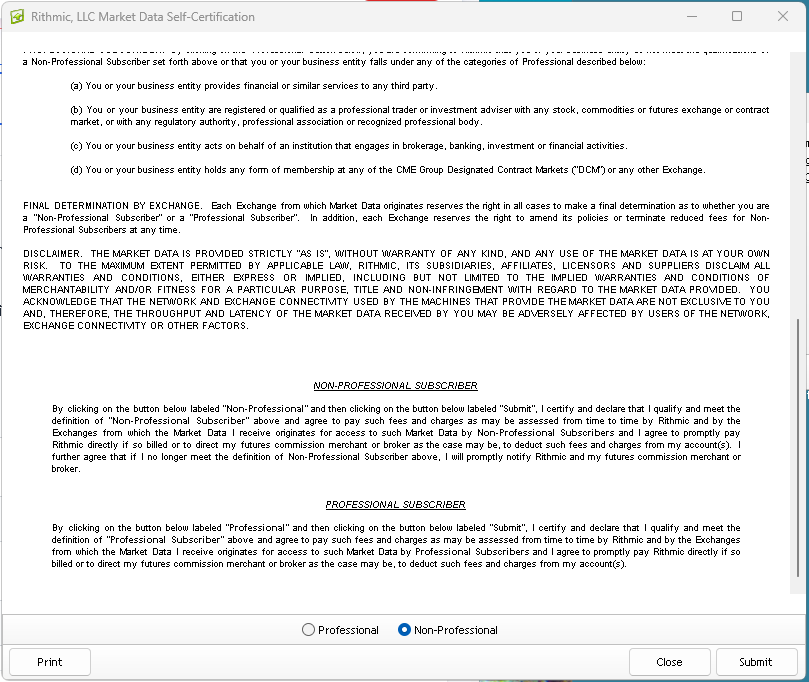
Non-Professional — required to avoid unexpected market-data fees. -
4
Confirm Connected & open the trader dashboard
Use the System/Gateway from your welcome email — not a live brokerage system. Confirm green Connected and your Edmond account ID with the correct starting balance.
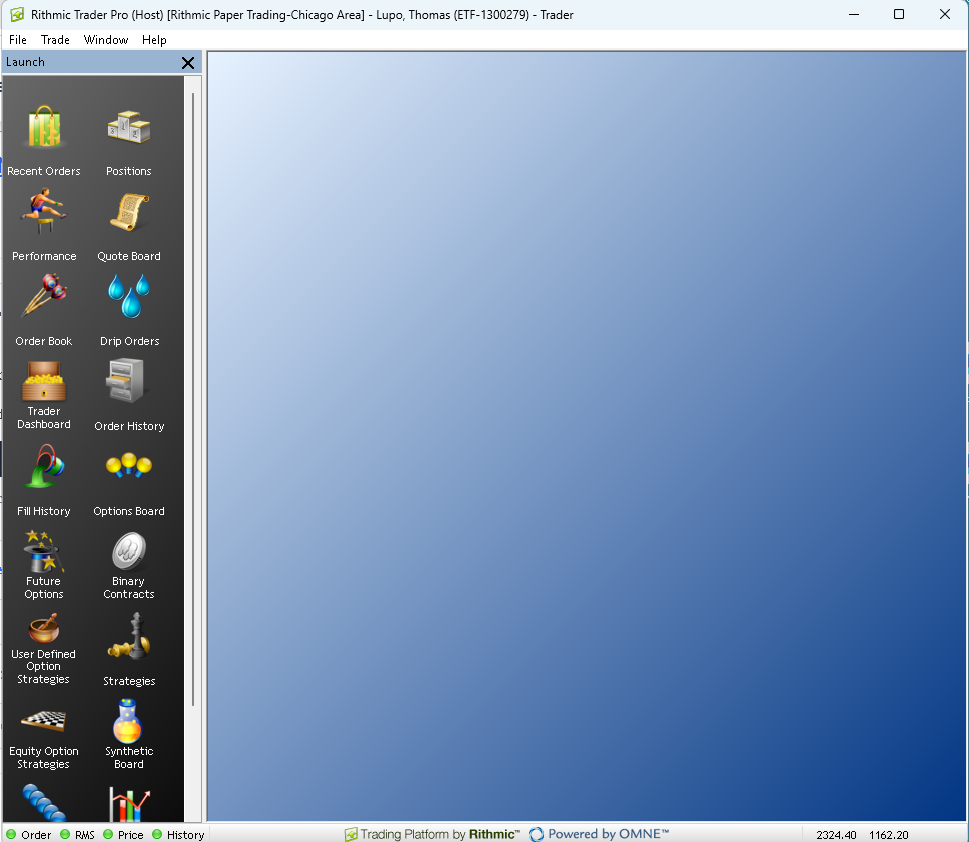
Connected — verify account ID and starting balance before trading. -
5
Optional: TradeSea (Edmond partner)
Same User ID and password. Quick connect:
- Open app.tradesea.ai and sign in
- Account Centre → Connect New → Edmond Trader Funding
- Paste Rithmic credentials → Environment: Simulation for eval
- Select the same eval account ID shown on your Edmond dashboard
4 — Place your first trade
Practice on R|Trader Pro. Prefer 1 MES (micro) over full-size ES while you learn the platform.
-
1
Open Order Book
On the trader dashboard, right-click your account row and choose Order Book (Ctrl+B).
-
2
Enter symbol (MES recommended)
Type MES (or ES, NQ, …) and press Enter. Confirm the contract month.
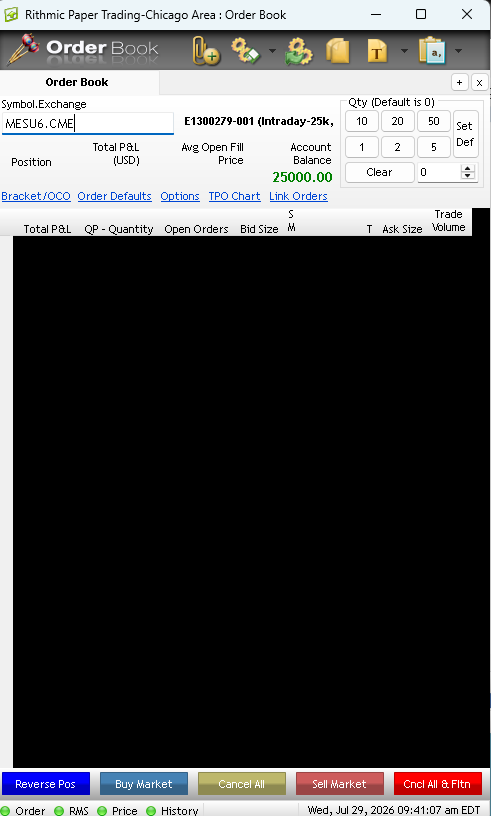
Enter symbol → Enter. -
3
Confirm account & start trading
Account dropdown must be your Edmond eval/PRO ID. Stay within your plan’s contract limit. Start with one micro contract.
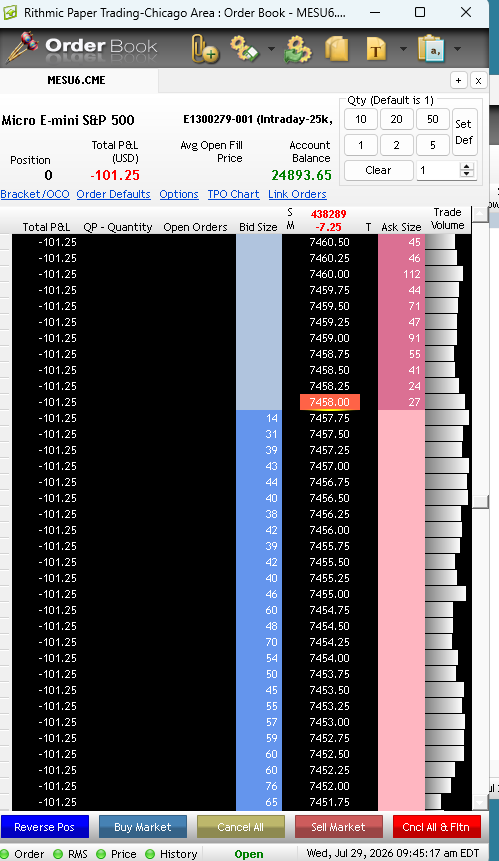
Confirm account, size, then place the order. -
4
Flatten before you leave
Close all contracts and cancel working orders. Edmond dashboard also has a Flatten control for emergencies. Evaluations must be flat by 3:59 PM EST.
5 — Use the Edmond dashboard daily
Trade in Rithmic; use the portal for account status, credentials, resets, and payouts.
- Active — you can trade. Failed — drawdown/daily limit breached; reset or new eval may be required.
- Pending EOD on charts — wait for overnight sync; check Rithmic for live P&L.
- Setup and Key — credentials anytime.
- Flatten from the dashboard only for emergencies; prefer flattening in the platform first.
6 — Day-to-day evaluation rules
Rules that apply every session on your evaluation. Details: Evaluation Accounts · Plan Rules.
- Goal: reach your size’s profit target without touching the drawdown threshold. No minimum trading days on eval.
- 30-day pass window: Day 0 (start) through end of Day 30. If you have not passed, the eval expires.
- Resets: paid resets use only remaining time in the same window — they do not add a new 30 days.
- Flat by session close: close positions and cancel working orders by 3:59 PM EST (earlier on holidays or products that close sooner). Holding through the cash close is prohibited.
- Directional only: no hedging one Edmond account against another. See Prohibited Activities.
- Contracts: fixed max for the eval size (e.g. $50K = 6 minis / 60 micros). Consistency and scaling start on PRO, not eval.
Intraday eval — quick numbers
| Size | Profit | Max DD | Contracts | Daily loss |
|---|---|---|---|---|
| $25K | $1,500 | $1,000 | 4 / 40 | None |
| $50K | $3,000 | $2,000 | 6 / 60 | None |
| $100K | $6,000 | $3,000 | 8 / 80 | None |
| $150K | $9,000 | $4,000 | 12 / 120 | None |
EOD eval — quick numbers
| Size | Profit | EOD max DD | Contracts | Daily loss |
|---|---|---|---|---|
| $25K | $1,500 | $1,000 | 4 / 40 | $500 |
| $50K | $3,000 | $2,000 | 6 / 60 | $1,000 |
| $100K | $6,000 | $3,000 | 8 / 80 | $1,500 |
| $150K | $9,000 | $4,000 | 12 / 120 | $2,000 |
7 — How not to fail
Touching the threshold (or daily limit on EOD) fails the evaluation. Market slippage on the exit does not undo a breach.
Intraday trailing — what fails you
- Live trailing threshold follows peak balance including unrealized P&L and never moves down.
- Touch or break the threshold → auto-liquidation and failed eval.
- There is no separate daily loss limit on intraday evals — the trailing threshold is the risk rule.
- Do not treat the full account threshold as your routine stop-loss.
Full walkthrough: Intraday Trailing Drawdown Evaluations.
EOD drawdown — what fails you
- EOD threshold is recalculated from your closing balance, then enforced live the next session (never moves down).
- Touching that threshold fails the evaluation.
- A session daily loss limit also applies (see table in Module 6).
Full walkthrough: EOD Drawdown Evaluations.
8 — Pass evaluation → activate PRO
Passing is not automatic funding — you must activate a matching PRO Account.
-
1
Hit the profit target
While staying above your model’s drawdown rules. No minimum day count on eval.
-
2
Activate PRO within 7 calendar days
Activation is a separate fee (not included in the eval payment). Choose the matching drawdown path (intraday or EOD). See PRO plan picker.
-
3
New credentials / account ID
After activation, confirm PRO account status on the dashboard and reconnect in Rithmic with the correct account selected.
9 — PRO day-to-day (summary)
PRO keeps your drawdown model and adds scaling, consistency, and payout eligibility. Official detail: Plan Rules · PRO Account info.
- Same close rule: flat by 3:59 PM EST; cancel working orders.
- Contract scaling: limits can grow with EOD profit tiers (not available during eval).
- Consistency: applies for payout eligibility (see Module 10) — not the same as eval rules.
- Intraday PRO threshold: trailing freeze typically at starting balance + max drawdown + $100 (e.g. $50K → freeze near $50,100 once protected). Details on the intraday help page.
- EOD PRO threshold: EOD threshold stops rising once it reaches starting balance + $100. Details on the EOD help page.
- Still directional only; credential sharing and prohibited tactics still apply.
10 — Payouts
Payouts are for PRO Accounts only — not evaluations. Official procedures: Payout Rules · how-to: Payouts guide.
-
1
Set a payout method
PayPal, Zelle, Cash App, Venmo, or paper check — on Payout Method. You are responsible for correct details.
-
2
Meet eligibility (summary)
- Minimum request $500
- 5 qualifying days: Intraday minimums $100/$200/$250/$300; EOD minimums $100/$250/$300/$350
- 50% consistency (no single day ≥ 50% of profit since last paid payout / inception)
- Balance above safety net + min request; sequential max caps per payout #
- Maximum 6 paid payouts per individual PRO Account; one pending request at a time
- Up to weekly requests when the selected PRO Account is eligible
-
3
Request & pause
Submit via Request Payout. After you submit, pause trading until Edmond reviews and updates the account.
11 — Quick troubleshooting
- Cannot log in to Rithmic: confirm User ID/password from Setup and Key; select the paper System/Gateway from the welcome email (not live).
- Wrong or missing account: wait for provisioning / EOD sync; refresh; contact support with your Edmond email and eval ID.
- Portal says pending EOD: normal — use Rithmic for live P&L until sync (Sun–Fri ~5:55–7:00 PM ET).
- Forgot Edmond password: use Login → reset; trading credentials are separate on Setup and Key.
- More: Troubleshooting · Connection Guide.
Public page references
Official public pages linked from this guide. Open these for full detail — this onboarding page stays a walkthrough summary.